
Ballerina makes it easier to use, combine, and create network services, let’s see how we can just quickly setup Ballerina in Travis, lets put on our dancing shoes and setup Ballerina with Travis.
Getting started
Let’s make a file called Ballerina.toml in our root directory, this is how mine looks:
[ballerina]
dependencies-toml-version = "2"

[[package]]
org = "ballerina"
name = "io"
version = "1.1.0"
dependencies = [
	{org = "ballerina", name = "jballerina.java"},
	{org = "ballerina", name = "lang.value"}
]
modules = [
	{org = "ballerina", packageName = "io", moduleName = "io"}
]

[[package]]
org = "ballerina"
name = "jballerina.java"
version = "0.0.0"

[[package]]
org = "ballerina"
name = "lang.value"
version = "0.0.0"
dependencies = [
	{org = "ballerina", name = "jballerina.java"}
]

[[package]]
org = "ballerina"
name = "observe"
version = "1.0.1"
dependencies = [
	{org = "ballerina", name = "jballerina.java"}
]

[[package]]
org = "ballerinai"
name = "observe"
version = "0.0.0"
dependencies = [
	{org = "ballerina", name = "jballerina.java"},
	{org = "ballerina", name = "observe"}
]
modules = [
	{org = "ballerinai", packageName = "observe", moduleName = "observe"}
]

[[package]]
org = "manu"
name = "semtype_test"
version = "0.1.0"
dependencies = [
	{org = "ballerina", name = "io"},
	{org = "ballerinai", name = "observe"}
]
modules = [
	{org = "manu", packageName = "semtype_test", moduleName = "semtype_test"}
]
Now let’s make a sample Ballerina file that just is a “Hello World” file:
import ballerina/io;

public function main() {
    io:println("Hello, World!");
}
Now let’s get to our .travis.yml file.
Travis configuration
This is my .travis.yml file, as you can see we wget Ballerina, and run some cursory Ballerina commands, just to make sure Ballerina is working:
dist: xenial
language: generic
group: edge
services:
  - docker
before_install:
  - wget https://dist.ballerina.io/downloads/2201.0.2/ballerina-2201.0.2-swan-lake-linux-x64.deb
  - sudo dpkg -i ballerina*.deb
  - bal version
  - sudo bal dist update
script:
  - bal pull ballerinax/twitter
  - bal run main.bal
  - bal search apache
  - bal grpc --input helloworld.proto --mode service --output service
  - bal grpc --input helloworld.proto --mode client --output client
  - bal grpc --input helloworld.proto --output stubs
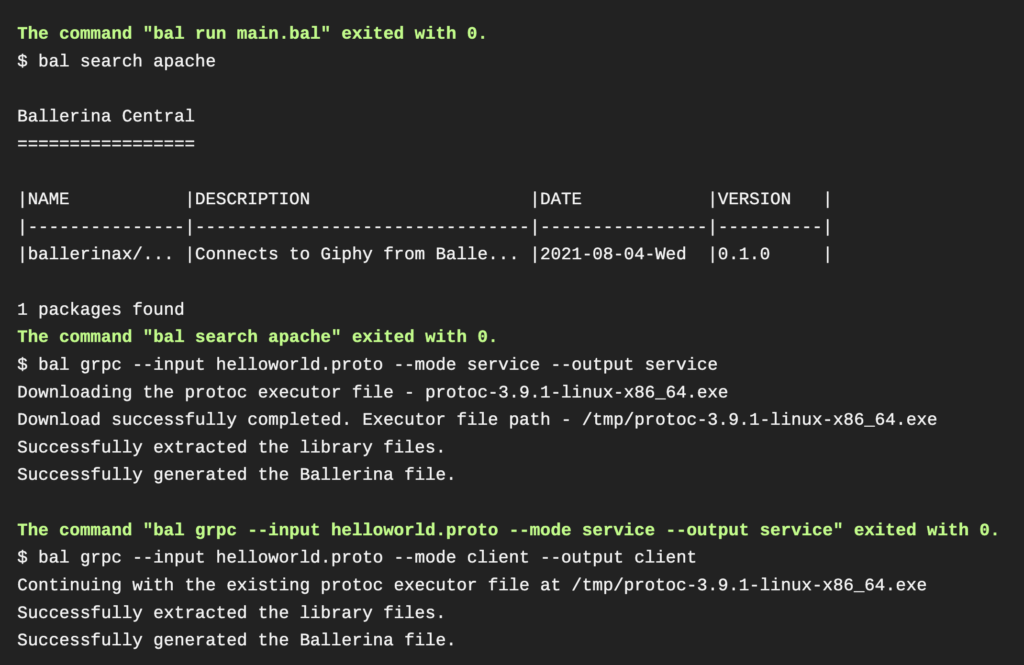
We’ve searched their Hub for a package called twitter, we find it, and then we run our Ballerina file called main.bal, and we see that it runs!
Conclusion
There you go, you’ve now just used Ballerina with Travis. So go ahead and dance around and see what you can accomplish with Travis CI and Ballerina.
As always if you have any questions, any questions at all, please email me at [email protected].
Happy building!